Statistics
Stats Panel
Introduction
The Stats panel lets you analyse your play level and track your progress over time using the positions imported in the database. It computes and displays PR (Performance Rating) and MWC cost (Match Winning Chance cost) for all positions or a filtered subset.
The Stats panel is especially useful for:
gauging your level against the level bands (World Class, Expert, Advanced…) using the global PR;
tracking your progress tournament by tournament or match by match using the Progression tab charts;
identifying your weak spots: the Errors tab shows the breakdown between checker plays and cube decisions, and the distribution of error magnitudes;
compare the players in the database with one another, one row per player, through the Players tab — useful for following an entire competition;
navigating directly to the relevant positions by clicking any indicator (drill-down).
The definition, formula, uncertainty and limits of each figure in the panel are gathered in Metrics and study tools.
Opening the panel
To open the Stats panel:
Press CTRL-D.
Type the
statsorstcommand in the command line.
Note
The panel refreshes automatically whenever the filter is changed. It does not recalculate statistics on a simple PR ↔ MWC toggle: both metrics are computed simultaneously by the backend.
Filter bar
The filter bar at the top of the panel restricts the computation to a subset of positions.
Player perspective
The Player field filters the statistics by the analysed player. Typing a few letters narrows the list to the names containing them; a click or Enter picks the player, ✕ or an emptied field returns to all perspectives.
The filter is one single filter for all the tabs of the panel and it is kept from one session to the next. It can also be set from the other panels: a player’s name in a match header or in the bar above the board opens all their statistics (tournaments and dates are cleared), and the Stats button in a tournament header opens those of that whole tournament (dates cleared, player kept). An end date earlier than the start date is refused: the field takes back the applied date.
Available filters
Tournament(s) — restrict to one or more tournaments. Multiple tournaments can be selected simultaneously.
Dates — time range (From … To). If only the start date is set, more recent positions are included.
Decision type — All / Checker plays / Cube decisions.
Match length — restrict to specific match lengths (1, 3, 5, 7, 9, 11, 13, 15, 21 points). Multiple lengths can be combined.
Engine and Min. depth — keep only the decisions analysed by a given engine, or at least at a given depth, in plies. The Engine menu offers the engines present in the database’s analyses (eXtreme Gammon, GNU Backgammon…).
A ↺ Reset button clears all filters except the player.
Note
Filters are saved in the blunderDB configuration (config.yaml) and restored on the next launch.
PR / MWC toggle
The PR / MWC button at the top of the panel toggles the metric displayed across all tabs.
PR (Performance Rating)
The average equity error per counted decision, multiplied by 500 as eXtreme Gammon and GNUbg do: a PR of 5.0 is 0.010 of equity lost per decision, i.e. 10 millipoints (mpt). The exact counting rule — which decisions enter the denominator, how the score is converted — is the one in PR (Performance Rating).
The level bands the panel draws behind the progress curve are an indicative marker specific to blunderDB: no publication is authoritative on these thresholds. The upper bound of each band is exclusive: a PR of 4 is Advanced, not Expert.
Level
PR
World Class
< 2
Expert
2 – 4
Advanced
4 – 6
Intermediate
6 – 9
Casual
9 – 12
Beginner
≥ 12
MWC cost (Match Winning Chance cost)
Cumulative match winning probability lost due to errors, over the full filtered dataset. Computed using the database’s current MET, by default the Kazaross-XG2 embedded in blunderDB. A match-score analysis computed with another table is “different MET” and stays out of the statistics.
Caution
MWC cost does not apply to money-game positions (with no match stake). Those positions are excluded from the MWC computation. MWC values depend on the MET used; they are not directly comparable across software using different METs.
MWC loss (7-pt eq.)
The probability of winning the match that a player lost across all their decisions — checker plays, cube, take or pass, with cube — scaled to a 7-point match. For an N-point match in which the player lost L of MWC:
L₇ = L × √(7 / N)
For a 7-point match, this is the match’s MWC loss, the one eXtreme Gammon displays. The square root comes from the FIBS formula’s model: at equal strength, a player’s loss grows as the square root of the match length. 7 points is the reference length because it is the most common in tournaments.
It reads as the share of the match lost against a perfect player: 12.3% means that instead of 50% winning chances against the engine, the player had only 37.7% in a 7-point match. The tooltip gives the reading as Elo against the engine, by inverting the FIBS formula: D = (2000 / √7) × log₁₀(q / (1 − q)), with q = 0.5 − L₇. Beyond a loss of 49%, the formula has no finite value: the displayed Elo is then a ceiling (”≤”). The two figures rank players in the same order.
It complements the PR without replacing it: the PR divides errors by a number of decisions, and that number depends on what is counted as a decision (forced moves, obvious cube decisions). The MWC loss counts no decisions: each error weighs what it cost at the score where it was made.
Over several matches (a player’s or a tournament’s statistics), the losses and the square roots of the lengths are added before taking the ratio: L₇ = √7 × ΣL / Σ√N. A 7-point match therefore weighs more than a 1-point match, and a single match gives its own value.
A single match is very noisy: a few big errors are enough to make it vary by a factor of two. The badge and the match summary (match summary) give the 95% interval by resampling its games; an aggregate (a player’s or a tournament’s statistics) gives it by resampling its matches; without a player filter, the two seats of a match form a single unit, since they play the same positions. At least three games, or three matches, are needed, and they must not all give the same loss: otherwise there is no interval. A per-match row of the statistics therefore has none: it is a single unit. Do not rank players on a single match.
Caution
A money-game has no match length: the MWC loss (7-pt eq.) is not defined there and the panel says so instead of displaying a number. Like the MWC cost, it depends on the MET.
The button’s third choice, MWC 7 pts, plots this loss in the Progression tab, and shows it on the dashboard cards and in the checker/cube comparison of the Errors tab, split into checker and cube on the same matches (the two parts add up). The player ranking has its column. Charts with no 7-point equivalent (per cube action) keep the MWC cost.
The PR ↔ MWC toggle is instant: no backend recalculation is performed.
The HTML report
The HTML report button in the panel’s header produces a self-contained document: a single file, with no external image, no remote stylesheet, no script. The diagrams are inline SVG, drawn by the same renderer as the board on screen, with your palette. It opens in any browser, travels by e-mail, and prints to PDF from the browser itself — which avoids embedding a PDF generator to produce what everybody already has.
It carries the current scope’s figures (positions, matches, counted decisions, global, checker and cube PR), then the ten most expensive decisions, each with its diagram, its cost, the match it comes from and the best move when an analysis gives one.
The document is built by the engine, not by the screen: the command line (stats report --html, see stats — Recurring errors) and the HTTP daemon (route stats.report) produce the same report, in any of the nine interface languages. Only the graphical application draws the diagrams with the board palette; the other two use the default palette.
The report carries the Stats panel’s current filter. A report that does not state its scope is a report whose figures mean nothing: set the filter — a tournament, a date range, a player — before producing it.
Dashboard tab
The Dashboard tab gives a synthetic view of the key indicators. It reads from top to bottom: the level cards, then what is worked on (study plan, top blunders), then the readings (rolling PR, before/after study, signed biases). The explanation of each card is in the tooltip of its title.
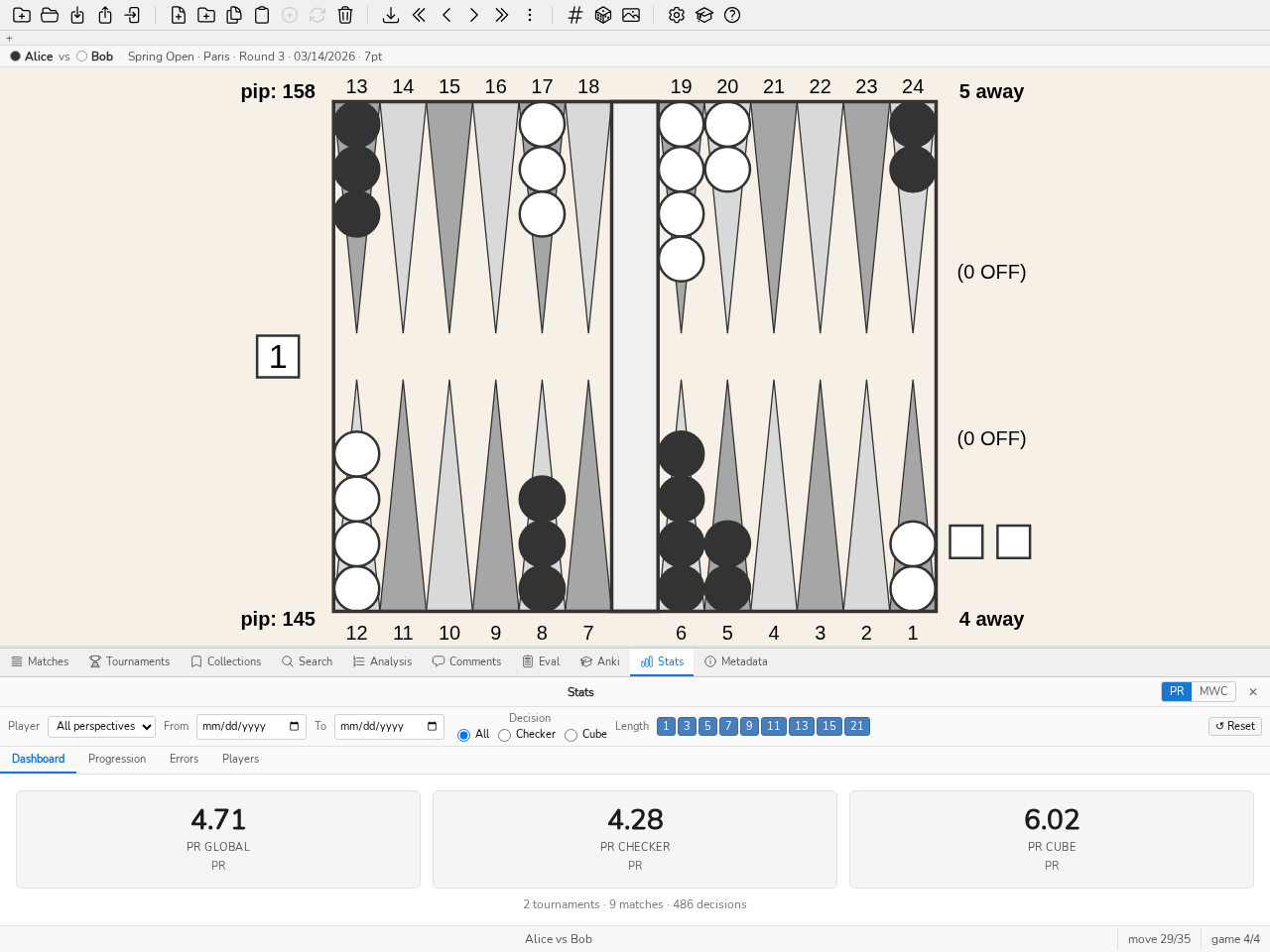
The Dashboard tab: global PR, checker PR, cube PR.
Level cards
Three cards display the PR (or MWC) for:
PR Global — all decisions (checker + cube);
Checker PR — checker decisions only;
PR Cube — cube decisions only.
Clicking a card loads the positions in the corresponding subset into the analysis panel (drill-down). A fourth card, MWC loss (7-pt eq.), gives this loss whatever the PR / MWC button is set to, with its interval; it loads nothing.
Below the cards, the totals line counts the filter’s tournaments, matches and decisions. The tournament count opens those tournaments in the Tournaments panel: a single tournament opens directly; several restrict the list, which then carries the button « N tournaments opened from Stats × »: it restores the full list.
The number of decisions opens their positions; the number of matches opens those matches in the Matches panel, except when a decision type or a provenance filter is active: it then counts fewer matches than the list would open and stays a plain number.
Note
The total number of decisions is shown at the bottom of each card on hover.
Study plan
The Study plan card answers “what should I work on now?”. Recurring mistakes (Errors tab) say where the filter lost the most; they do not say where study pays off the most. A family of truly hard positions costs everyone dearly, and three mistakes do not make a trend. The plan corrects both.
A family is a group of recurring mistakes: a game plan, a kind of decision (checkers or cube) and a theme. Mistakes without a theme form none: they point to nothing to study.
Each mistake is priced in MWC, as in the Match panel: its loss ℓ, and its difficulty d, the loss a reference player would have suffered in the same position (see the per-decision difficulty in the Match panel). A mistake in a free game has no MWC: it is only counted, “unpriced”.
The recoverable MWC of a family is the sum of ℓ − d over its mistakes: the family’s frequency times its average loss beyond the difficulty. It is what you would regain by playing these positions like the reference player. A family of avoidable mistakes rises, a family of positions where everyone errs falls.
The 95% interval accompanies every figure. A family enters the plan from 5 mistakes and an interval entirely above zero; the plan is ranked by the lower bound of the interval, so that at equal recoverable the best-established family comes first. The others are named under the list, to be confirmed, without a rank: the plan does not push you toward noise. The same line counts the mistakes outside the plan (without a theme, not quantified).
Each row of the plan shows its rank, the family, a bar whose length is its recoverable MWC relative to that of the first, this MWC with its interval, and the number of mistakes. Every count of positions in the plan (per family, to confirm, outside the plan) is clickable: it loads exactly those positions into the list.
Each family offers three actions: Study opens the study queue on its positions, the largest gap to the reference player first; Quiz starts the Decision exercise of the Training panel on twenty of them; Anki turns them into a deck of cards. At the top of the card, Quiz on the top three families draws twenty positions from those of the three leading families. The plan follows the panel’s filter: set the player to get your plan. On the command line: blunderdb stats plan (see stats — Recurring errors).
Before/after study
The Before/after study card closes the plan’s loop: does what you worked on cost you less in real matches? Without it, study is judged by feel; with it, a family that does not move despite the work says you should change method, and a family that improves can give up its place in the plan.
A family (the plan’s family) is studied on the date of the first study action on one of its positions: the “studied” mark in the study queue, an Anki review, a quiz answer. Creating a card or filing a position in a collection does not count.
For each studied family, the card compares two windows: the matches played before that day and those played after it (the day itself is left out). In each, the loss rate is the MWC lost by the family’s mistakes, relative to all decisions of the same game plan and the same kind, and shown in MWC points per 100 decisions.
The gain is the before rate minus the after rate, with its 95% interval. The verdict is “improved” (or “worse”) only if each window has at least 30 decisions and the interval excludes zero; otherwise it stays “undetermined” or “too few decisions”.
Next to each window, the Positions column counts the distinct positions of its decisions and opens them with a click; the number in brackets remains the number of decisions, the rate’s denominator.
This is a change, not an effect: a family is studied because it was costing you, and part of the gain is regression to the mean; nothing controls for opponents, format or dice. On the command line: blunderdb stats effect (see stats — Recurring errors).
Signed biases
The Signed biases card tells you in which direction you go wrong, not just how much. “You take too much” is easier to fix than a PR: the rule to review is named. Each bias is the share of faulty decisions in one direction minus the share of faulty decisions in the other, with its 95% interval; a tendency is named only from 20 decisions and an interval that excludes zero.
Take / pass — on cube responses: faulty takes (the bot passes) minus faulty passes (the bot takes). This is exactly your take rate minus the bot’s on the same positions.
Doubles — on doubling decisions: premature doubles (the bot does not double, or the position is too good to double) minus missed doubles. The same bias is given by score (your away, your opponent’s, a post-Crawford score counted as 1 point; money play in its own cell), for the scores with enough decisions.
Blots — on checker plays with contact: plays that leave more blots than the best play minus those that leave fewer. A play is recognized by the board it leaves, whatever its notation (“13/7(2)”, “8/5*/4”); a play the move generator still cannot replay is discarded, and the share of discarded plays is given under the table. The bias counts blots without weighing their exposure: a blot out of reach counts as much as an exposed one.
Next to each count, its cost in millipoints tells you whether the tendency costs you; a position played in several matches counts there with the move played in each. The biases follow the panel’s filter. On the command line: blunderdb stats biases (see stats — Recurring errors).
Each count of decisions (all, one way, the other way) is followed by a Positions column: the distinct positions of those decisions, which a click opens. A position played in several matches counts one decision per match, but a single position.
Rolling PR over last N decisions
A row of PR (or MWC) values computed over the last N decisions (N = 5, 10, 50, 100, 250, 500, 1000) lets you measure the recent trend. Greyed values correspond to an N larger than the number of available decisions.
Clicking a value loads the corresponding last N positions.
Top blunders
The list of the 10 worst errors (or MWC cost), sorted by descending magnitude. Clicking a row loads the relevant position in the analysis panel.
Progression tab
The Progression tab shows how your level evolves over time.
At the top of the tab, a goal: “PR < 5 within twelve weeks”. A target, a deadline, and a trend that says where you are heading — nothing more. A goal that started grading, congratulating or reminding would be a different feature, not this one.
The Suggest button proposes a target from your current level: the lower bound of the band you are in, that is, the entry into the next one. Proposing “a bit better” would be anchored to nothing; proposing a band says something — going from intermediate to advanced can be seen and told.
The trend is a least-squares fit over your matches’ PR, projected to the deadline. It refuses to speak below three matches: drawing a line between two points would be a claim that cannot be held. And the sentence says so every time — a trend is not a prediction.
The goal is stored in the database’s metadata, not in the configuration: it is about that library, so it follows the file rather than the machine. No schema change: metadata is already a key/value table, readable by blunderdb info as by the daemon.
Tournament line chart
A line chart shows the PR (or MWC) of each tournament: one point per tournament, labelled with its name, in the chronological order of its date — failing that, the date of its oldest match (Y axis: the metric’s value). Coloured bands mark the level thresholds.
Clicking a point on the chart opens a context menu with two options:
Open tournament — opens the tournament in the Tournaments panel.
Open positions — loads all positions from the tournament into the analysis panel.
Match scatter plot
A scatter plot shows each match (X axis: date, Y axis: PR or MWC). The size of each point is proportional to the number of decisions in the match. A match without a date does not appear.
Clicking a point opens a context menu:
Open match — opens the match in the Matches panel.
Open positions — loads all positions from the match into the analysis panel.
Errors tab
The Errors tab breaks down error sources.
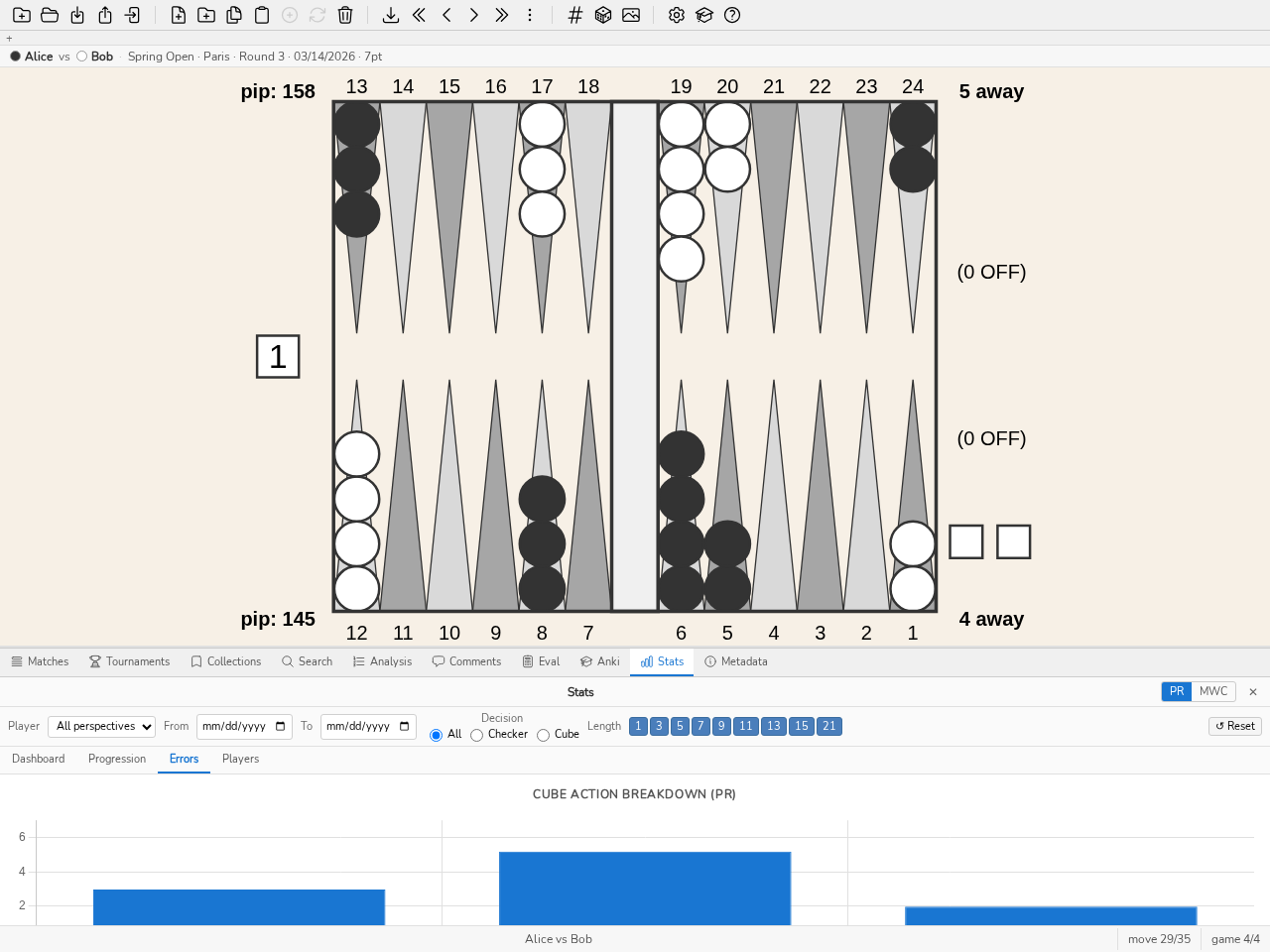
The Errors tab: PR breakdown by cube action.
Recurring errors
At the top of the tab, a table groups the errors of the current filter — so those of a single player when a player is filtered — by game plan and by theme, the most costly first. It answers the question “where am I losing the most?”: for example, “holding · too many blots”.
An error is a counted decision whose cost reaches the library’s Error threshold.
The game plan is that of the player on roll, as the Breakdowns tab presents it.
The theme of a checker play is the one named by the rules of the explanation sentence in the Analysis panel: gammon underestimated, too many blots, point not made, too passive. That of a cube decision is the direction of the error, as in the cube error direction below: missed double, premature double, wrong pass, wrong take.
An error that no rule names with confidence is not guessed: it leaves the ranking and appears apart, under the table, as one line per game plan (“no theme identified: N errors, cost X”), clickable too. This remainder is often the heaviest, because the explanation only speaks from 60 mp, above the Error threshold: ranked with the others, it would top a table that said nothing.
The cost is the share of the filter’s PR that the group represents: the PR formula applied to the group’s errors, divided by all counted decisions. The costs of the groups therefore never exceed the PR.
Clicking a group, or its error count, loads its positions, from the most costly to the least costly. The theme is recomputed at every display, never stored: like the game plan, it is a derived label that cannot be edited. On the command line: blunderdb stats recurring (see stats — Recurring errors).
Each row offers three ways to go from the error to study: Quiz this group starts the Decision exercise of the Training panel on the group’s positions, Anki deck makes a deck of cards from them, Collection files them in a new collection. Above the table, Quiz my three worst groups draws twenty positions at random from those of the three costliest groups. On the command line, stats recurring --quiz draws these positions and --deck creates the deck.
Breakdown by cube action
A bar chart displays the PR (or MWC) for each type of cube decision: NoDouble, DoubleTake, DoublePass, TooGood. Each bar also shows the number of decisions and the blunder rate in a tooltip.
Clicking a bar loads the positions matching that cube action, only those with an error (drill-down).
Direction of cube errors
The breakdown above says how much cube decisions cost; this table says in which direction they go wrong.
A cube position carries two decisions taken by two different players, presented here as two rows:
Offer — the player holding the cube doubles or does not. Their errors are the missed doubles (a double was called for) and the premature doubles (it was not).
Answer — the player being offered the cube takes or passes. Their errors are the wrong passes (a correct take was passed) and the wrong takes (a correct pass was taken).
The two rows are deliberately kept apart: a player can perfectly well double late and take loosely, and a single figure would call that “balanced” while losing both halves of the information.
Each cell shows the number of decisions; the tooltip gives the cumulated equity lost. Clicking a cell loads the matching positions. A cell at zero is not clickable.
Note
This table counts decisions, it passes no judgement. At what gap a tendency deserves to be named depends on the sample size and on a point of reference, neither of which the engine holds.
Checker / Cube comparison
A comparison chart places checker plays and cube decisions side by side. Clicking a bar loads the positions in the subset with an error.
Error magnitude histogram
A histogram distributes errors by magnitude in millipoints (mpt, buckets: 0–5, 5–10, 10–25, 25–50, 50–100, ≥ 100). Clicking a bar loads the positions in the bucket.
Training over time
The Training tab sets side by side, over the same calendar windows — the week or the month, as you choose — three series that measure progress in three ways:
the quiz PR: that of the Decision exercise sessions in the Training panel, weighted by the number of decisions judged. It is computed on the real PR scale, so it is comparable to it;
the match PR of the current filter, weighted by the number of decisions;
the Anki retention: the share of reviews of already learned cards graded Hard or better, read on the right axis (in %).
Below the chart, the quiz PR by plan of play lists the quiz decisions drawn from library positions, the worst plans first, with the PR of the last window in which the plan was played.
In parentheses, the number of decisions or reviews behind each value: a window without samples has no value — a dash, not a zero. A window’s number of match decisions opens their positions. The filter restricts the matches only; the quiz and Anki journals are yours and carry no player. Nothing more is recorded: the three series are read back from the existing journals. On the command line: blunderdb stats training (see stats — Recurring errors).
Breakdowns tab
The Breakdowns tab slices the same decisions the global figures count along four axes. None of them redefines what counts as a decision: that would be a second PR wearing the same name.
By game phase — opening, middlegame, race, bearoff. This is what answers “my PR in the race versus my PR in contact”. The label is computed from the board (see Search Panel); a database whose phases were never computed files everything under Unclassified, and
blunderdb repairfills it in.By plan of play — race, blitz, holding, backgame, prime vs prime… This is the breakdown the classifier exists for: “where do I lose the most?”, plan by plan. The same derived label as the phase, the same caveats, and
blunderdb repairfills it the same way.By tag — the
#wordwritten in the comments. A position may carry several: these rows do not sum to the total, and the panel says so under the table. A tag labels; it does not partition.By score — both sides’ away score, read from the side of the player on roll, that is from the side of whoever is deciding. The Money row is money play. A cell with fewer than ten decisions is greyed with its count still visible rather than hidden: too few to read, but the omission stays auditable.
The Positions and Blunders columns count distinct positions, and every figure is a link: a click loads exactly these positions into the analysis panel, like the counters of the status bar. Blunders counts the positions where at least one decision is a blunder. A position played in several matches (an opening, for example) counts only once there; the Decisions column counts it each time, because it is the denominator of the PR.
Each row carries its 95 % confidence interval (column 95 % CI), which replaces the fixed ten-decision threshold: it says what a PR is worth, not only how many decisions carry it. It resamples the matches of the selection, not the decisions or the games: the games of a match share opponent, session and fatigue, and counting them as independent would give too narrow an interval; with no player filter, the two seats of a match form a single unit. A row that rests on fewer than three matches, or whose matches all give the same PR, has no interval and is greyed out, even with many decisions: two matches say nothing about the dispersion, and identical matches say they agree, not that the PR is exact. For study: a family of positions whose interval stays above your overall PR is an established weakness; a row with a wide interval does not yet justify a study plan. The dashboard’s overall PR carries the same interval, under its card.
Note
In the breakdown by score, a post-Crawford score is read as 1-away: the Crawford game and the post-Crawford games at the same score fall into the same cell.
Study and real play
The command blunderdb list --type study --days 30 puts three numbers side by side, plan of play by plan of play: how many distinct positions were revised over the period, what the PR was before it, what the PR is since.
Three numbers, and no fourth. There is no gain column and no arrow, because nothing here controls for anything: the player may have met stronger opponents, changed format, or simply played more races this month. The rapprochement is the reader’s; a column announcing an effect would claim a causality these data do not carry. The numbers themselves are exact.
Reviews are counted as distinct positions: a card revised four times in the month is one position studied, and counting the repetitions would make a month of cramming look like a month of coverage. The PR’s decisions, on the other hand, are all counted — each was taken once. A PR resting on fewer than ten decisions shows —, with its sample visible beside it.
Players tab
The five previous tabs describe one player; the Players tab compares them all. It shows one row per player in the database, which answers the need of an organiser following a whole competition rather than one particular player.
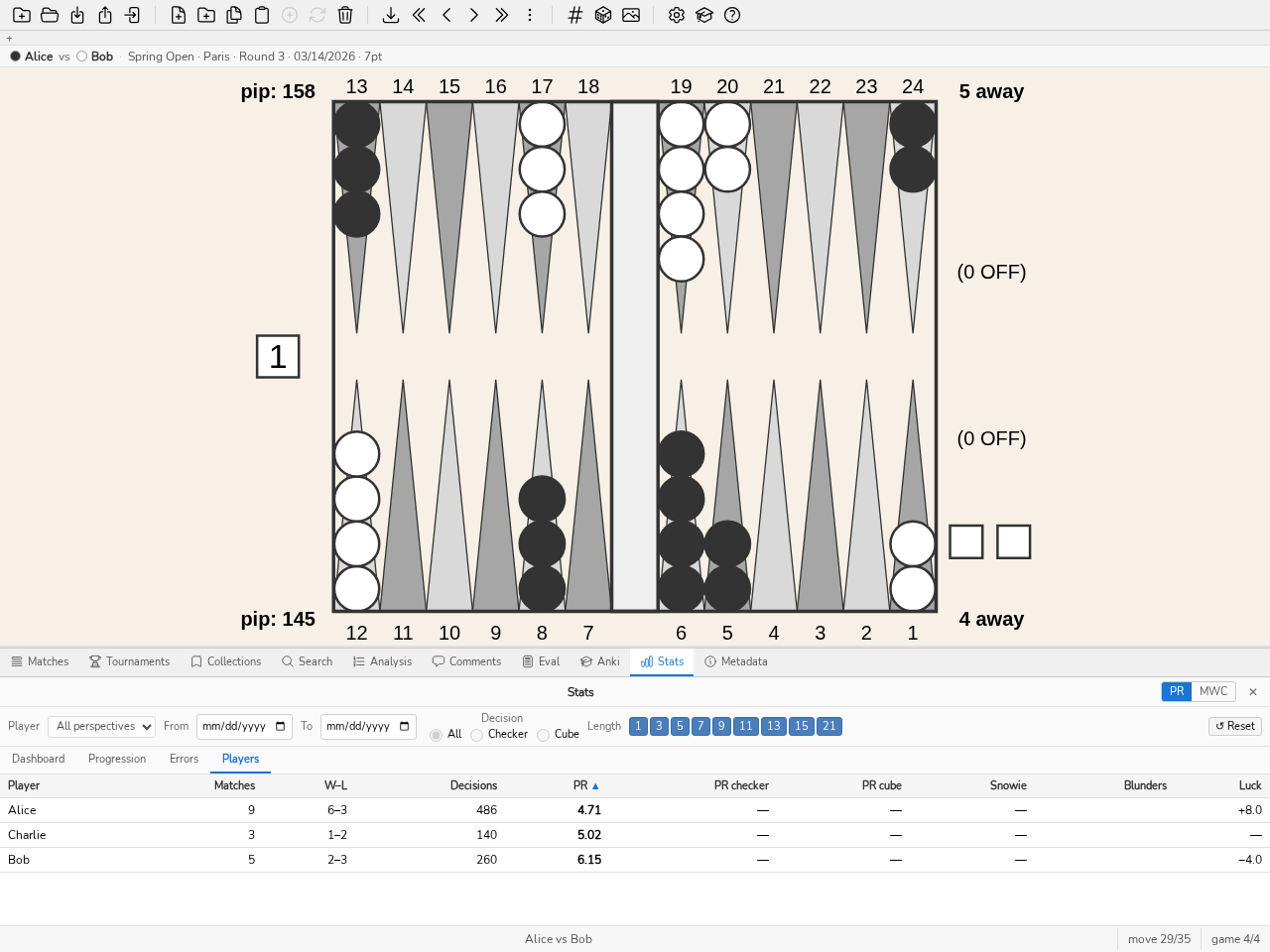
The Players tab: one row per player, sortable by any column.
Columns, in order:
Column |
Meaning |
|---|---|
Player |
The name as it appears in the matches. A player recorded under two spellings shows up on two rows, unless one is an alias of the other (Corpus section of the settings): the row then carries the canonical name. |
Matches |
Number of matches played within the retained period. |
W–L |
Wins and losses. An unfinished match (truncated log, resignation) counts as neither: W + L can therefore be lower than the number of matches. |
Decisions |
Number of counted decisions — the PR’s denominator. This is the column that says what the neighbouring rates are worth: a PR computed over twelve decisions means nothing. |
PR |
Overall Performance Rating. |
Checker PR, Cube PR |
The PR split by decision type. |
Snowie |
Snowie Error Rate (see Annex: Statistics model — XG / gnuBG / blunderDB alignment). |
Blunders |
Number of errors reaching the library’s blunder threshold (0.100 EMG by default). Clicking this number loads those positions into the analysis panel. |
Luck |
Average luck per roll, in millipoints (mpt), signed: positive if the dice were favourable. |
Use:
Sort — click a column header. The table opens sorted by ascending PR, best player first, and remembers the last sort chosen from one session to the next. Players for whom nothing was measured stay at the bottom whichever way the sort goes: a zero for lack of data is not a perfect performance.
Filter by column — the row of fields under the headers filters each column: a piece of a name for text, a bound for numbers (
>=500,>500,<2.5,<=2), a range (3-7) or an exact value (5). An unreadable field is outlined in red and filters nothing; a value never measured passes no bound. Column filters last for the session. The player ranking reads like this: sort by PR, Decisions column filtered by>=500. All the tables of the Stats panel — breakdowns, corpus, recurring errors, thinking time, training, bias, study effect — are sorted and filtered the same way.Open a player’s detail — click a row. The player is selected in the filter bar and the display switches to the Dashboard tab.
Open one’s decisions — the number of decisions opens their positions, under the table’s filters. The number of matches and the W–L record remain plain numbers: they also count matches without any analysed decision, which no match list reproduces.
Narrow the period — the date, tournament and match-length filters apply as usual, which makes it possible to bound the table to the dates of a competition.
Compare two players — tick the box in the first column on two rows. A block appears above the table and sets their figures face to face; ticking a third player replaces the older of the two. The box does not select the row: ticking compares, clicking opens the detail.
See the positions where one played better — the button of the comparison block lists the positions both players had to play and where one played well (below the library’s Error threshold) and the other did not, widest gap first; a player is judged on their worst play of the position. Open these positions loads them into the analysis view. The command line and the server give the same list (
stats contrast).Score the plays first — the list only compares plays whose error is scored, and no import scores them: scoring is done on request. While some remain to be scored, the block gives their number with a Score the plays button; the command line does the same with
repair --move-errors.
In that block, only the rates get a verdict, and the better of the two is set in bold. Three figures never get one, and it is worth saying why. Luck is not a quality: a luckier player is not a better one. Matches, record and decisions say what the rates are worth, but putting them in competition would let whoever simply played more win. The blunder count does not compare raw — twelve out of a thousand decisions beat ten out of a hundred — so the block adds a Blunders / 100 dec. line, which does compare, and leaves the count beside it as context.
A tie is not a win: it is set in bold on neither side. A rate with nothing behind it shows as “—” and decides nothing.
Note
In this tab, the decision type choice is disabled: the table already breaks checker and cube decisions down into separate columns. The player of the filter bar stays active: the table always shows all the players, and this player’s row is highlighted and scrolled into view.
Two corpus views are in the panel’s Corpus tab, on the command line and through the daemon API (see stats — Recurring errors): the head-to-head of two players (common matches, each one’s PR, record) and the rolling PR per calendar window (1, 3, 6 or 12 months). The Corpus tab computes each view on demand, under the current filter. The PR ranking is read in the Players tab, sorted by PR and filtered on the Decisions column; the command line and the API also give it (stats ranking). A provenance filter (Engine and Min. depth fields of the filter bar) restricts the statistics to decisions analysed that way; it applies to each decision, and the figures it affects are then recomputed from the decisions. The head-to-head and the PR per window do not accept it: while it is active, they refuse to compute. Like the rest of the bar, it is kept from one session to the next.
In the Corpus tab, each row opens what it summarises. The head-to-head record opens its matches in the Matches panel, which then carries the button “N matches opened from Stats ×”: it restores the full list; a head-to-head row opens its match. The first player of the head-to-head is by default the one of the filter bar. A window row and its decision count open its positions, its match count opens the matches. A position count in the Stats panel, in whichever tab, first leaves the current match before opening its list; the m command then reopens the match at the saved move.
Important
A dash (”—”) marks a value that was never measured, not to be confused with zero. That is notably the case of the Luck column for any match imported before schema version 2.15.0: luck was not stored then, and nothing allows it to be reconstructed afterwards. Re-importing the source file is not enough: the import recognises a duplicate and applies only the study marks newly raised (the report gives their number). The match must be deleted, then imported again. Formats that do not carry it (BGF, Jellyfish .mat) never will.
Aggregation rule
Important
The PR of a tournament (or any subset) is computed using the sum/sum rule — never as an average of individual match PRs.
Formula:
Example: a player plays two matches in a tournament —
Match A: 10 decisions, 0.100 of lost equity → PR = 5.0
Match B: 90 decisions, 0.540 of lost equity → PR = 3.0
Naive average of PRs: (5.0 + 3.0) / 2 = 4.0 (incorrect)
Sum/sum rule: 500 × 0.640 / (10 + 90) = 3.2 (correct)
The sum/sum rule is the only one that handles varying match lengths correctly (a 21-point match carries more weight than a 1-point match).
MWC: limitations
By default, MWC cost is computed from the Kazaross-XG2 MET, the de facto reference table in competitive backgammon. Results are not directly comparable with software using other METs. It is the same table, read through the same entry point, that the embedded evaluator uses for its cube decisions at a match score: the statistics and the engine cannot diverge on this. It gives its own values up to 25 points to go on each side; beyond that, it is extended by a Zadeh table computed the same way as GNUbg’s, up to 64.
Money-game positions (with no match score) are excluded from the MWC computation. If your database contains many money-game positions, the MWC cost may be underestimated or unavailable.
The MWC cost is cumulative over the full filtered dataset — not a per-decision indicator. It measures the total impact of your errors on your winning chances.